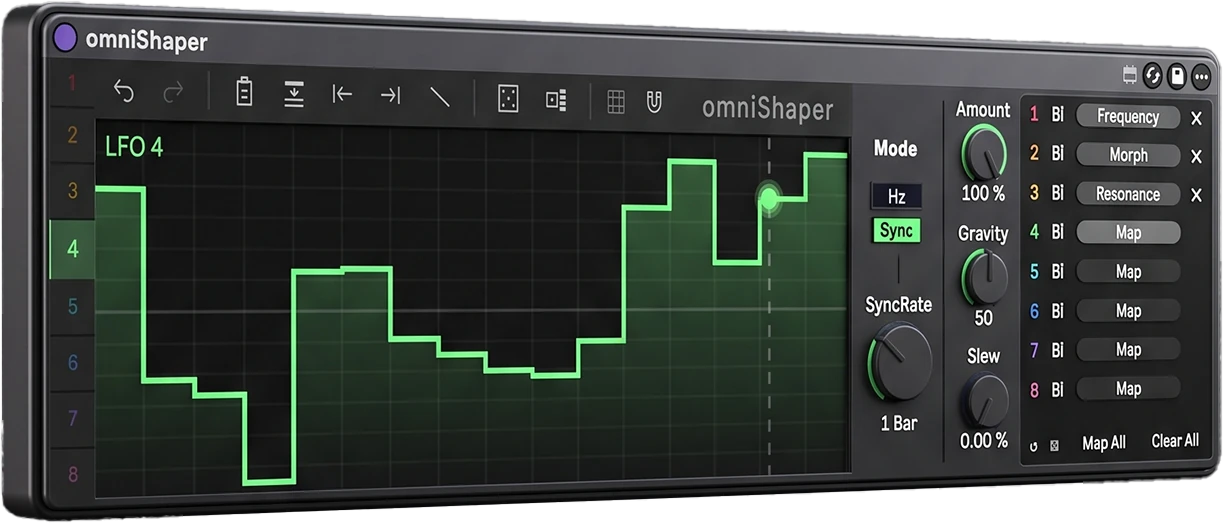
omniShaper
8x Super-powered Shapers for Ableton Live.
Finally it's here!
omniShaper is a Max for Live device that gives you eight independent Complex LFO lanes and lets you draw the shape of each one by hand. You can also randomize them and let yourself be surprised by happy accidents. But not any kind of happy accident: controlled ones!
Send any lane to any automatable parameter in your Live set: a filter cutoff, a send level, another device's macro, even a knob on a different track. A lane can be a plain sine, a 32-step rhythm, a slow 16-bar swell, or a euclidean pulse pattern. You decide.
Generate it.
Classic waveform presets
Sine, Triangle, Square, Saw Up, Saw Down.
Five randomizers
Segments, Peaks, Steps, Curves, Euclidean.
Roll one lane or all eight.
Pro tipTurn on Snap to Grid to keep the Curves and Segments randomizers aligned to the grid, in sync with your project.
Shape it.
Freehand curve editor
Double-click to add or delete nodes. Drag them around. Drag the line between two nodes to bend it. Drag a flat step to move it up or down as one piece.
Step sequences in one move
Hold Shift and sweep across the grid. Every column you cross becomes a step at the height of your cursor.
Nudge
Turn on Snap to Grid and use Nudge to shift the whole shape by one step.
Pro tipHold Shift while nudging for finer, more precise moves.
Shape the movement.
Hz or Sync, per lane
Free-run from 0.1 to 10 Hz, or lock to the transport in 19 divisions from 16 bars to 1/16 triplet, including dotted and triplet. Sync lanes follow Live's transport position, so they never drift and land in the right place when you jump around the timeline.
Amount
From −100 % to +100 %. Negative values flip the shape upside down.
Gravity
Gravity pulls the whole curve toward its floor or ceiling without touching a node. Good for shapes that feel "mostly open" or "mostly closed".
Slew
Slew turns hard edges into smooth glides. A trailing dot shows the smoothed output next to your drawn curve.
Pro tipAmount and Gravity are automatable Live parameters on every lane.
Clipboard & Apply to All.
Copy & paste
Copy a lane and paste it onto one lane or all eight. Copy all eight as a set and paste them back later, even between devices in the same Live set.
Apply to All
Send one lane's rate, grid, Amount, Gravity or Slew (or all of them) to the other seven. Each lane keeps its own shape.
Map it.
Map anything
Click Map, then click any parameter in Live. omniShaper uses Live's native modulation, so the knob is still yours to turn.
Map All
Binds all eight rows in one pass.
Clear All releases them all in one click.
Lane router
Each of the 8 mapping rows has a coloured number that shows which lane drives it. Click it to switch lanes. Several rows can read the same lane, so one drawn shape can move up to eight parameters at once.
Polarity per row
Bipolar swings around the knob value, + only goes above it, − only goes below.
Put two rows on one lane with opposite polarity and a filter opens while a send closes.
Safe by design
A row can't map onto the device's own controls, and it clears itself if its target device is deleted.
And so much more to discover!
Get omniShaper.
A single Max for Live device: 8 lanes and 8 mapping rows per instance. Load as many instances as you like. No subscription.
- Max for Live device (.amxd) for Ableton Live 11 or later, macOS & Windows
- 8 hand-drawn LFO / shaper lanes with waveform presets and five randomizers
- 8 mapping rows, each routable to any lane, with its own polarity
- Hz (0.1–10) or 19 tempo-synced divisions, set per lane
- Clipboard, Apply to All and per-lane undo
- Audio-rate engine, phase-locked to Live's transport
- One file: the interface is built into the .amxd
- Full user manual included
One payment. Yours to keep.
Buy omniShaper — €24Secure checkout via Gumroad · Instant download after purchase
Questions, answered.
Do I need a separate Max license?
No — omniShaper is a Max for Live device. It runs inside Ableton Live's own Max for Live environment, which is included in Live Suite and available as an add-on for Live Standard.
Which Ableton Live version do I need?
Live 11 or later, with Max for Live installed. Runs on both macOS and Windows.
Is the modulation calculated in the browser or in Live's audio engine?
In Live's own audio-rate DSP. The on-screen curve editor just draws the shape — the modulation itself runs natively, so it stays accurate at any buffer size.
Can I map more than 8 parameters?
Each instance gives you 8 lanes and 8 mapping rows. Load another instance on any track, or the same one, for more. You can copy lanes between instances with the shared clipboard.
Can one lane modulate several parameters?
Yes. Every mapping row has a coloured lane number. Click it to choose which lane drives that row. Any number of rows can read the same lane, each with its own polarity, so one drawn shape can open a filter while it closes a send.
Does omniShaper change my audio?
No. It's an audio effect that passes audio through untouched. It's there to modulate, so it can sit on any track, including an empty one used just for modulation.
Can I install it on more than one computer?
Yes. The licence is per person, not per machine, so you can use it on all your own computers. Anything you make with omniShaper is entirely yours: no royalties, no credit required.
How do I install it?
Put omniShaper.amxd in your Live User Library and drag it onto a track. It's a single file with the interface built in. Activate it once with your licence key; every copy on that computer, including future updates, stays activated.
What if I run into an issue?
Reach out to support@l32.studio — happy to help.
Join the community.
Any suggestion, feedback, request for next versions? Join my community: